Is the IPGeolocation.io Free Developer Plan Really Free?
The free Developer plan gives you 1,000 credits a day for life, no credit card required. Here’s what it covers, what requires a paid plan, and what happens when you hit the daily limit.

Yes. The free Developer plan gives you 1,000 credits a day for life, with no credit card. It costs $0 and can't run up a bill: after 1,000 credits, further credit-consuming requests return HTTP 429 Too Many Requests until the allowance resets at 00:00 UTC, and the free plan never charges overage. You can use the free Developer plan in production and for commercial purposes, as long as you stay within 1,000 credits a day and follow our Terms of Service. Every plan, including the free Developer plan, gets its lookup results from the same database, so the data you get on the free plan is as accurate as on a paid plan.
The limits are on daily volume and on the data a free-plan key can request:
| Feature | Free Developer plan |
|---|---|
| Price | $0, free for life |
| Credit card | Not required |
| Daily allowance | 1,000 credits, reset at 00:00 UTC |
| Cost per call | 1 credit for an IP lookup or a Time Zone, User Agent (GET), or Astronomy API call |
| Rate limits | None per second or per minute |
| When credits run out | HTTP 429 Too Many Requests until the reset; no overage charges |
| Included data | Location, country metadata, currency, basic ASN, and time zone data; User-Agent header parsing |
| Needs a paid plan | Security data (VPN, proxy, and Tor detection), company and abuse contact data, bulk lookups, and user agent data inside the IP lookup, among others |
| Production and commercial use | You can use the free Developer plan in production and for commercial purposes, as long as you stay within 1,000 credits a day and follow our Terms of Service. |
| Uptime SLA | 99.99%, on every plan including free. |
To start, create a free IPGeolocation.io account.
What the Free Developer Plan Includes
The free Developer plan covers two kinds of calls at 1 credit each: IP lookups that return five groups of data, and three standalone APIs for time zones, user agent parsing, and astronomy.
An IP lookup returns:
- Location: continent, country, state or province, district, city, ZIP code, latitude and longitude, whether the country is in the EU, and its flag.
- Country metadata: calling code, country top-level domain, and the languages spoken.
- Currency: the local currency's code, name, and symbol.
- ASN basics: the AS number, the organization that operates it, and its registration country.
- Time zone: the IANA zone name, UTC offset, current local time, and daylight saving details.
A free-plan IP lookup doesn't return user agent data. On the free plan, that comes from a separate call to the User Agent API, so IP and user agent data for one visitor take two calls and 2 credits, and 1,000 daily credits cover 500 visitors that way. The standalone APIs a free-plan key can call:
- Time Zone API: the time zone and current local time for a time zone name, coordinates, an address, an IP address, or an airport code, plus conversion between time zones.
- User Agent API: the browser, device, operating system, and layout engine, parsed from the User-Agent header of each GET request it receives at
/v3/user-agent, with classifications for recognized crawlers and malformed or suspicious user-agent strings. Sending a custom string in a POST body, or parsing in bulk through/v3/user-agent-bulk, needs a paid plan. - Astronomy API: sunrise, sunset, moonrise, moonset, and sun and moon positions for a location and date.
Credits are the unit IPGeolocation.io's API plans count usage in, and only successful (HTTP 200) responses use them.
The illustration below shows a free-plan response structure.
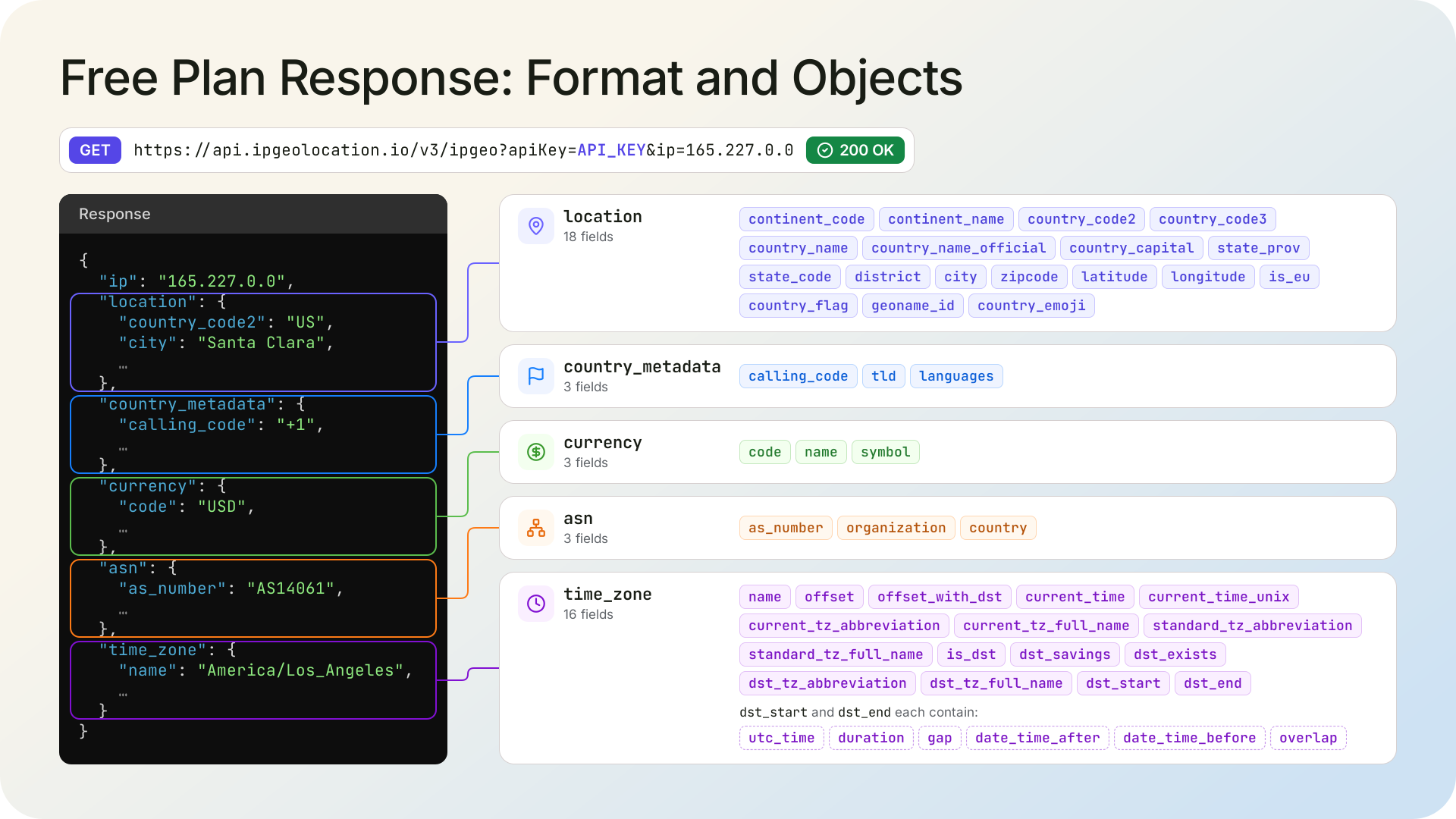
Here is a real request with a free-plan key, made for 165.227.0.0 on October 25, 2026. The data updates daily, so the same IP can show a different city on another day.
curl -i 'https://api.ipgeolocation.io/v3/ipgeo?apiKey=API_KEY&ip=165.227.0.0'
HTTP/2 200
content-type: application/json
vary: Origin
vary: Access-Control-Request-Method
vary: Access-Control-Request-Headers
x-credits-charged: 1
{
"ip": "165.227.0.0",
"location": {
"continent_code": "NA",
"continent_name": "North America",
"country_code2": "US",
"country_code3": "USA",
"country_name": "United States",
"country_name_official": "United States of America",
"country_capital": "Washington, D.C.",
"state_prov": "California",
"state_code": "US-CA",
"district": "Santa Clara County",
"city": "Santa Clara",
"zipcode": "95051",
"latitude": "37.35983",
"longitude": "-121.98144",
"is_eu": false,
"country_flag": "https://ipgeolocation.io/static/flags/us_64.png",
"geoname_id": "5346804",
"country_emoji": "🇺🇸"
},
"country_metadata": {
"calling_code": "+1",
"tld": ".us",
"languages": [
"en-US",
"es-US",
"haw",
"fr"
]
},
"currency": {
"code": "USD",
"name": "US Dollar",
"symbol": "$"
},
"asn": {
"as_number": "AS14061",
"organization": "DigitalOcean, LLC",
"country": "US"
},
"time_zone": {
"name": "America/Los_Angeles",
"offset": -8,
"offset_with_dst": -7,
"current_time": "2026-10-25 00:11:17.130-0700",
"current_time_unix": 1792912277.13,
"current_tz_abbreviation": "PDT",
"current_tz_full_name": "Pacific Daylight Time",
"standard_tz_abbreviation": "PST",
"standard_tz_full_name": "Pacific Standard Time",
"is_dst": true,
"dst_savings": 1,
"dst_exists": true,
"dst_tz_abbreviation": "PDT",
"dst_tz_full_name": "Pacific Daylight Time",
"dst_start": {
"utc_time": "2026-03-08 TIME 10:00",
"duration": "+1.00H",
"gap": true,
"date_time_after": "2026-03-08 TIME 03:00",
"date_time_before": "2026-03-08 TIME 02:00",
"overlap": false
},
"dst_end": {
"utc_time": "2026-11-01 TIME 09:00",
"duration": "-1.00H",
"gap": false,
"date_time_after": "2026-11-01 TIME 01:00",
"date_time_before": "2026-11-01 TIME 02:00",
"overlap": true
}
}
}The X-Credits-Charged: 1 header shows the call used 1 credit, and nothing paid is in the response: no security, company, abuse, network, or user_agent object, no extended ASN fields. Every endpoint is served over HTTPS, and on IP lookups the fields and excludes parameters trim the response to what you need. One endpoint doesn't need the plan at all: Get IP (/v3/getip) returns your public IP address, needs no API key, and uses no credits. The field reference for the IP Geolocation API marks every field FREE or PAID.
Paid-Only Data and Features
Paid plans add more data, such as accuracy radius, company, network, and security data. Here is everything a paid plan adds:
- Location precision: accuracy radius, confidence, locality, and DMA code.
- Security data: VPN, proxy, residential proxy, and Tor detection with a threat score from 0 to 100, plus bot, known-attacker, and spam flags.
- ASN and network details: the ASN's type, domain, allocation date, and registry, plus the network route, connection type, and hostname.
- Company data: the name, type, and domain of the company behind the address.
- Abuse contact data: the registered contact for reporting abuse from the address.
- User agent parsing beyond the GET endpoint: user agent data inside the IP lookup, plus custom-string (POST) and bulk parsing on the User Agent API.
- Delivery features: bulk lookups, lookups by domain, responses in languages other than English, Request Origin (CORS) authentication, and extra API keys.
- Dedicated paid APIs: the IP Security, ASN, and IP Abuse Contact APIs, plus Real-Time Proxy & VPN Detection, a browser-side script that tests a visitor's connection live instead of looking the address up.
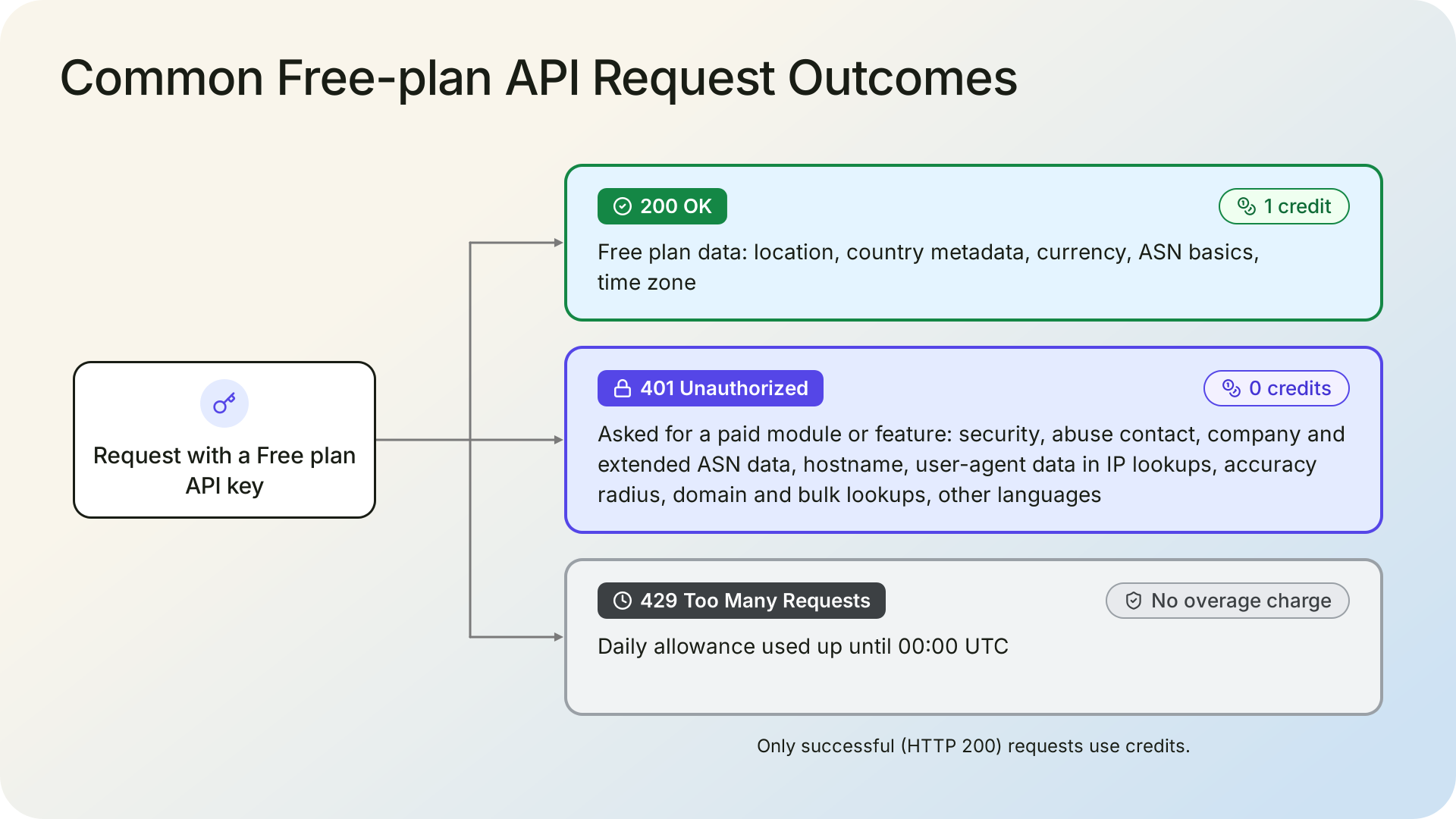
Free-plan keys can't access paid data or paid endpoints. The API returns a 401 Unauthorized when the key requests a paid object or field through include (include=security, include=abuse, or include=user_agent, for example), sends the User Agent API a custom string in a POST body, calls the IP Security, ASN or IP Abuse Contact API, calls a bulk endpoint, looks up a domain, or asks for a language other than English. A 401 isn't a successful response, so it uses no credits.
If you call the API from a web page, one more limit matters. Request Origin (CORS) authentication, which lets a browser call the API without exposing your key, is a paid feature, so on the free plan the key belongs on your server. The tutorial on securing your API key shows how to route browser calls through a backend. For the User Agent API, the backend call needs one extra step. The GET endpoint parses the User-Agent header of the request it receives, and the User Agent API documentation describes it as meant for client-side calls, where the browser adds the visitor's header automatically. When your server makes the call instead, set that header to the visitor's user agent string, as the documentation's curl examples do.
For the full side-by-side, see the pricing page's plan comparison.
The 1,000-Credit Daily Limit
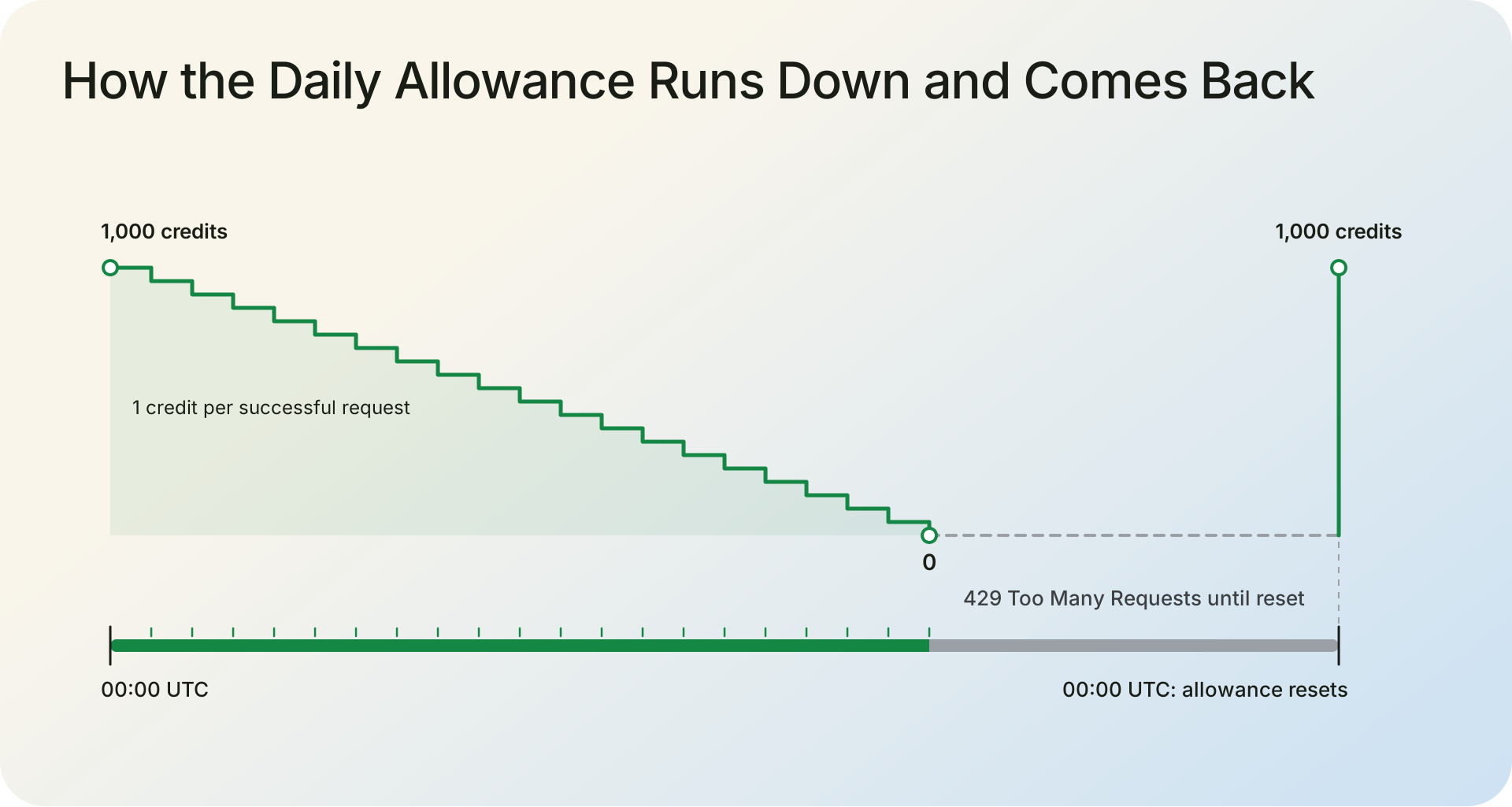
The free plan has a hard limit of 1,000 credits a day, with no per-second or per-minute rate limit on top of it. The allowance is shared: IP lookups and calls to the Time Zone, User Agent, and Astronomy APIs all draw from the same 1,000. Once the credits are used, the API answers further credit-consuming requests with HTTP 429 Too Many Requests until the allowance resets at 00:00 UTC. The 429 response says your plan's limit has been reached and suggests upgrading.
The free plan never charges overage. Once the daily allowance is used, you can wait for the reset at 00:00 UTC or upgrade to any paid plan. Unused daily credits do not carry forward.
Your dashboard shows credits used and remaining, and every successful response carries an X-Credits-Charged header with what that call cost. To make the allowance go further, cache results per IP address and per user agent string, so repeat visitors don't cost a credit each time. And filter out private and reserved (bogon) addresses before calling: the API answers them with HTTP 423 and a message such as "'10.0.0.1' is a bogon IP address". Those calls use no credits but still cost a round trip.
Production and Commercial Use
You can use the free Developer plan in production and for commercial purposes, as long as you stay within 1,000 credits a day and follow our Terms of Service. Every plan, including the free Developer plan, gets its lookup results from the same database, so the data you get on the free plan is as accurate as on a paid plan. The 99.99% uptime SLA covers all plans, including the free Developer plan. If you need more than 1,000 credits a day, upgrade to any paid plan. Endpoints and response format stay the same, so your code does not change.
Sign up with a real company or personal email address, since signups from disposable addresses are deleted. IPGeolocation.io doesn't encourage opening extra free accounts to multiply the daily allowance; if one account's 1,000 credits aren't enough, upgrade to any paid plan.
When You Need a Paid Plan
Move to a paid plan when any of these is true:
- Your app regularly runs out of credits before 00:00 UTC.
- A decision depends on VPN, proxy, and Tor detection or a threat score.
- You need company or abuse contact data for the addresses you see.
- You need user agent data in bulk or in the same response as the IP data.
- You have a batch of addresses to enrich at once.
- Your web pages need to call the API directly without putting your key in the page.
IPGeolocation.io's paid plans start with Starter at $19 a month for 150,000 credits. Every paid tier includes the same features; the tiers differ in included credits, overage pricing, overage caps, and the number of extra API keys or Request Origins.
One paid IP Geolocation API lookup can return location, security, ASN, company, abuse contact, time zone, and user agent data together, so a single response can show that a login from the expected city is coming through a VPN on a hosting network. That full lookup uses 4 credits rather than 1, because security data adds 2 and abuse contact data adds 1, while user agent data adds none. The credits documentation lists what each call costs.
To check paid data such as security data before buying, ask our support team or live chat for a free trial of a paid plan.
Frequently Asked Questions
Can I use the free Developer plan in production or for commercial purposes?
Yes. You can use the free Developer plan in production and for commercial purposes, as long as you stay within 1,000 credits a day and follow our Terms of Service. On the free plan, call the API from your server to keep your key private, because Request Origin (CORS) for browser calls is a paid feature.
Is the free Developer plan less accurate than paid plans?
No. Every plan, including the free Developer plan, gets its lookup results from the same database, so the data you get on the free plan is as accurate as on a paid plan. For the same IP, the fields both plans return have the same values. Paid plans add more data, such as accuracy radius, company, network, and security data.
What if I need more than 1,000 credits a day?
If you need more than 1,000 credits a day, upgrade to any paid plan. Endpoints and response format stay the same, so your code does not change. Starter costs $19 a month for 150,000 credits, and every paid tier includes the same data; the tiers differ in included credits, overage pricing and caps, and the number of extra API keys or Request Origins.
Does the free Developer plan expire?
No. The free Developer plan gives you 1,000 credits a day for life, with no credit card. It has no end date.
Do I need a credit card for the free Developer plan?
No. IPGeolocation.io doesn't ask for a payment method when you create a free Developer plan account; an email address or a Google or GitHub account is enough. Payment details come in when you buy a paid plan.
What are the limits of the free plan?
The free plan includes 1,000 credits a day, shared across IP lookups and the Time Zone, User Agent, and Astronomy APIs, with no per-second or per-minute rate limits. Once the credits are used, further credit-consuming requests return HTTP 429 until the reset at 00:00 UTC, with no overage charges. Security, company, network, extended ASN, and abuse contact data, bulk lookups, domain lookups, non-English responses, and POST user agent parsing need a paid plan.
Is the User Agent API included in the free Developer plan?
Yes, through its GET endpoint. On the free plan, the User Agent API parses the User-Agent header of each GET request it receives for 1 credit, and returns the browser, device, operating system, and layout engine details. When your server makes the call, set that header to your visitor's user agent string. Custom strings sent in a POST body, bulk parsing, and user agent data inside the IP lookup need a paid plan.
Can I call the API from the browser on the free Developer plan?
Only by exposing your key. Calling the IPGeolocation.io API straight from a web page puts your free-plan key in the page's code. Request Origin (CORS) authentication avoids that, but it's a paid feature. Keep the key on your server and call the API from there; for the User Agent API, set the request's User-Agent header to the visitor's user agent string.
Is the IP geolocation database included in the free Developer plan?
No. The free Developer plan covers the API only. The downloadable IP databases are a separate paid product with its own database pricing.
Can I try paid data such as VPN detection before paying?
Yes. To check paid data such as security data before buying, ask our support team or live chat for a free trial of a paid plan. To check a single address right away, use the lookup box on the IP Security API page; it shows the address's threat score and VPN, proxy, and Tor flags in the browser, with no code required.
Get a Free API Key
The free Developer plan gives you 1,000 credits a day for life, with no credit card. Create a free account to get your API key, with location, currency, basic ASN, and time zone data on every IP lookup, plus User-Agent header parsing. When your app needs more than 1,000 credits a day, or paid data such as security, company, or abuse contact data, see the paid plans.