Auto-Detect Country Code and Time Zone on Signup Forms
Pre-fill a signup form's country, phone dial code, and time zone from one IP lookup on your server, then let the browser and the visitor correct them. Tested Node.js and intl-tel-input code.

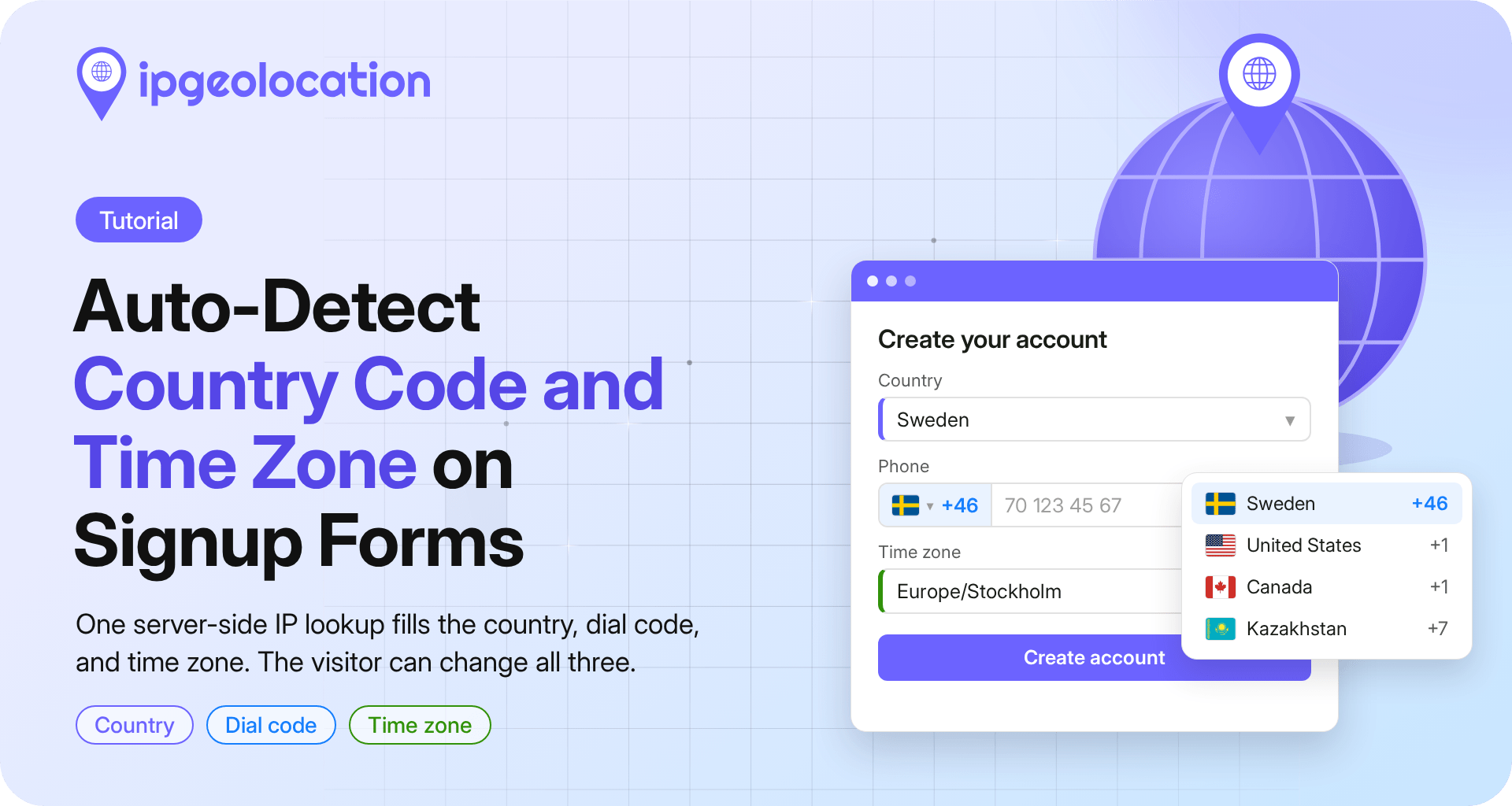
A signup form can auto-detect country code and time zone from the visitor's IP address. Your server looks up the IP with IPGeolocation.io and sends the page three defaults: the country, the phone dial code, and the time zone. The browser confirms the time zone, and anything the visitor picks wins. You'll build it in Node.js and plain HTML with the intl-tel-input phone field.
TL;DR
To auto-detect country code and time zone on a signup form, serve /api/signup-defaults from your server: one IPGeolocation.io lookup returns location.country_code2, country_metadata.calling_code, and time_zone.name. The page fetches it after loading, passes the country to intl-tel-input's initialCountryLookup, and prefers the browser's own time zone.
- On localhost, the API answers HTTP 423 for 127.0.0.1; test with a public IP.
- Pre-fill signup forms only. On profile or edit forms, the saved value wins.
What to pre-fill, and what to leave to the visitor
Pre-fill the fields every visitor fills and an IP predicts well at country level; leave anything more precise to the visitor:
| Field | First choice | Fallback | Always wins |
|---|---|---|---|
| Country | IP lookup: location.country_code2 |
"Choose your country" | The visitor's selection |
| Phone dial code | IP lookup: the same country, set in intl-tel-input | No country selected | The visitor's selection |
| Time zone | The browser's time zone | IP lookup: time_zone.name |
The visitor's selection |
| City, state, postal code | Leave empty on signup |
Select the phone country by its two-letter code, never by the dial code alone. Several countries share a code: +1 covers the United States, Canada, and many Caribbean nations, and Russia and Kazakhstan share +7.
We treat every IP value as a suggestion, never as verified information, so the form must work the same way when detection fails; each step names its fallback.
Before you start
node -vprints 18 or later, which the IPGeolocation.io JavaScript SDK needs.- Your IPGeolocation.io API key sits in the
IPGEO_API_KEYenvironment variable, never in browser code. Our guide to keeping your API key off the client covers the options.
Create the project:
mkdir signup-defaults && cd signup-defaults
npm init -y
npm pkg set type=module
npm install ip-geolocation-api-javascript-sdk express libphonenumber-js
The browser loads intl-tel-input 29.5.10 from jsDelivr. Each step shows part of server.js or public/signup.html; both files are in full in the complete code.
Step 1: Find the visitor's IP behind your proxy
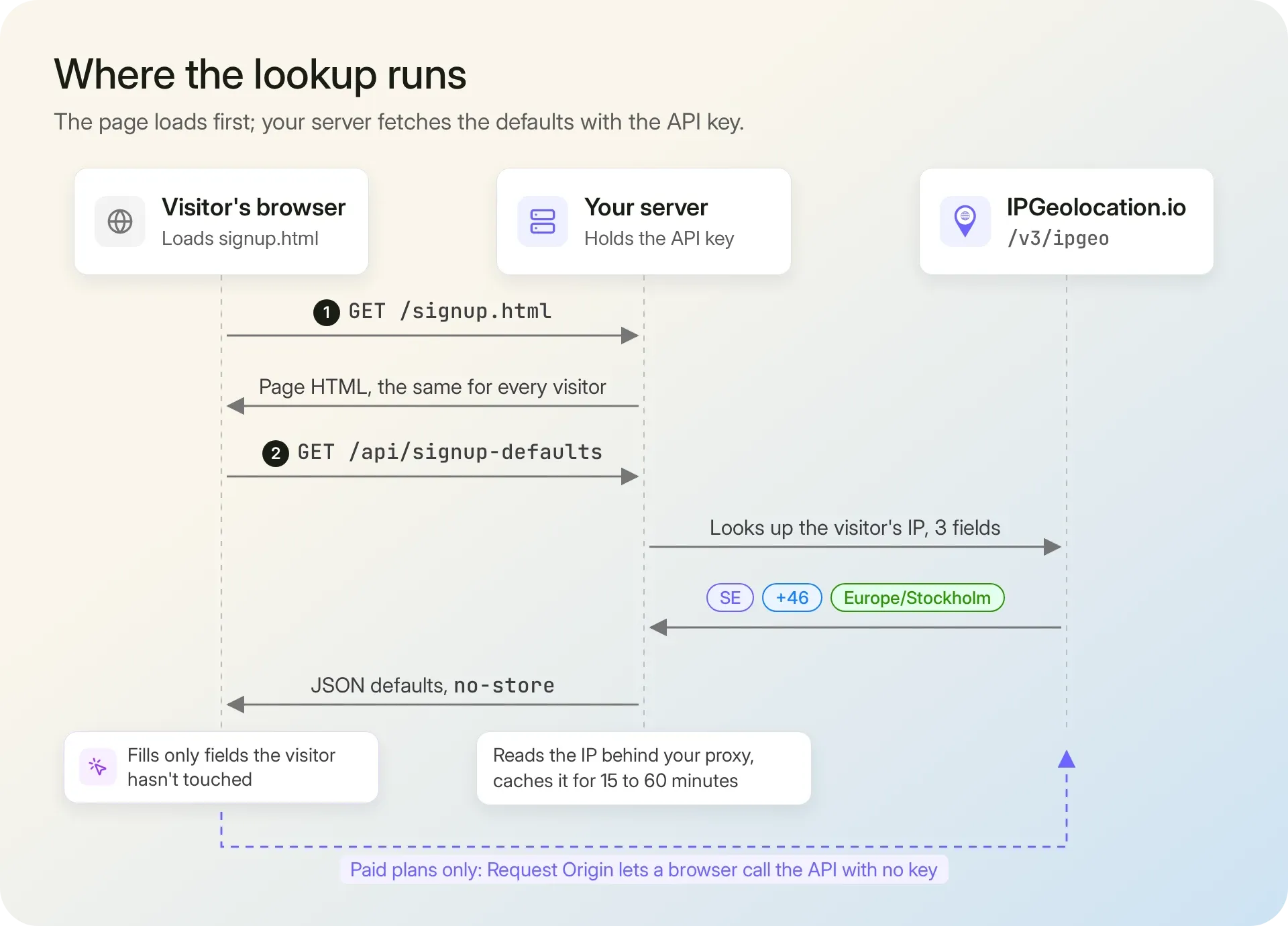
Express reports the visitor's IP as req.ip, but only once you tell it how many proxies sit in front of your app. Without that setting, req.ip is your load balancer's address:
const app = express();
app.set("trust proxy", 1); // one proxy (your load balancer) in front; match your setup

// Step 1: the visitor's IP; TEST_IP only replaces loopback addresses during local tests
function visitorIp(req) {
  const isLocal = ["::1", "127.0.0.1", "::ffff:127.0.0.1"].includes(req.ip);
  return isLocal && process.env.TEST_IP ? process.env.TEST_IP : req.ip;
}
With one trusted hop, Express takes the address your own proxy added to X-Forwarded-For and ignores anything a client wrote further left. For CDNs and longer chains, see our guide to reading the visitor's real IP behind a proxy.
On your laptop, req.ip is ::1 or 127.0.0.1, and the API answers with HTTP 423: "'127.0.0.1' is a bogon IP address." Set TEST_IP=91.128.103.196, a sample address from our documentation, while you develop. Two mistakes we see often start here: looking up the load balancer instead of the visitor, and moving the lookup into browser code, key and all.
Step 2: Detect the visitor's country, dial code, and time zone
To detect the visitor's country, the IPGeolocation.io IP Geolocation API needs one request, limited to three fields: the country, the dial code (calling_code in the API), and the time zone. The answer is cached per IP:
import {
  IpGeolocationClient,
  LockedError,
  RateLimitError,
  UnauthorizedError,
} from "ip-geolocation-api-javascript-sdk";

const ipgeo = new IpGeolocationClient({
  apiKey: process.env.IPGEO_API_KEY,
  connectTimeoutMs: 1000, // 1.5 seconds in total, the same time the form waits
  readTimeoutMs: 500,
});

const CACHE_MS = 30 * 60 * 1000; // 30 minutes covers a typical signup session
const cache = new Map();

// Step 2: country, dial code, and time zone for one IP, cached per IP
async function lookupDefaults(ip) {
  const hit = cache.get(ip);
  if (hit && hit.expires > Date.now()) return hit.value;

  let value = null;
  try {
    const { data } = await ipgeo.lookupIpGeolocation({
      ip,
      fields: ["location.country_code2", "country_metadata.calling_code", "time_zone.name"],
    });
    // The SDK returns camelCase: country_code2 arrives as countryCode2
    value = {
      country: data.location?.countryCode2 ?? null,
      callingCode: data.countryMetadata?.callingCode ?? null,
      timeZone: data.timeZone?.name ?? null,
    };
  } catch (err) {
    if (err instanceof LockedError) {
      // 423: a private or bogon IP, such as ::1 on localhost; nothing to detect
    } else if (err instanceof UnauthorizedError || err instanceof RateLimitError) {
      console.error(`IPGeolocation.io ${err.statusCode}: ${err.apiMessage ?? err.message}`);
    } else {
      console.error(`Defaults lookup failed for ${ip}: ${err.message}`);
    }
  }

  // Cache a failure for one minute only, so a single timeout doesn't stick for the session
  cache.set(ip, { value, expires: Date.now() + (value ? CACHE_MS : 60 * 1000) });
  if (cache.size > 50_000) cache.delete(cache.keys().next().value);
  return value;
}
The response field reference spells fields in snake_case, such as time_zone.name; the SDK object uses camelCase (timeZone.name), and the snake_case spelling gives you undefined.
In our run on November 2, 2026, lookupDefaults("91.128.103.196") returned:
{ country: 'SE', callingCode: '+46', timeZone: 'Europe/Stockholm' }
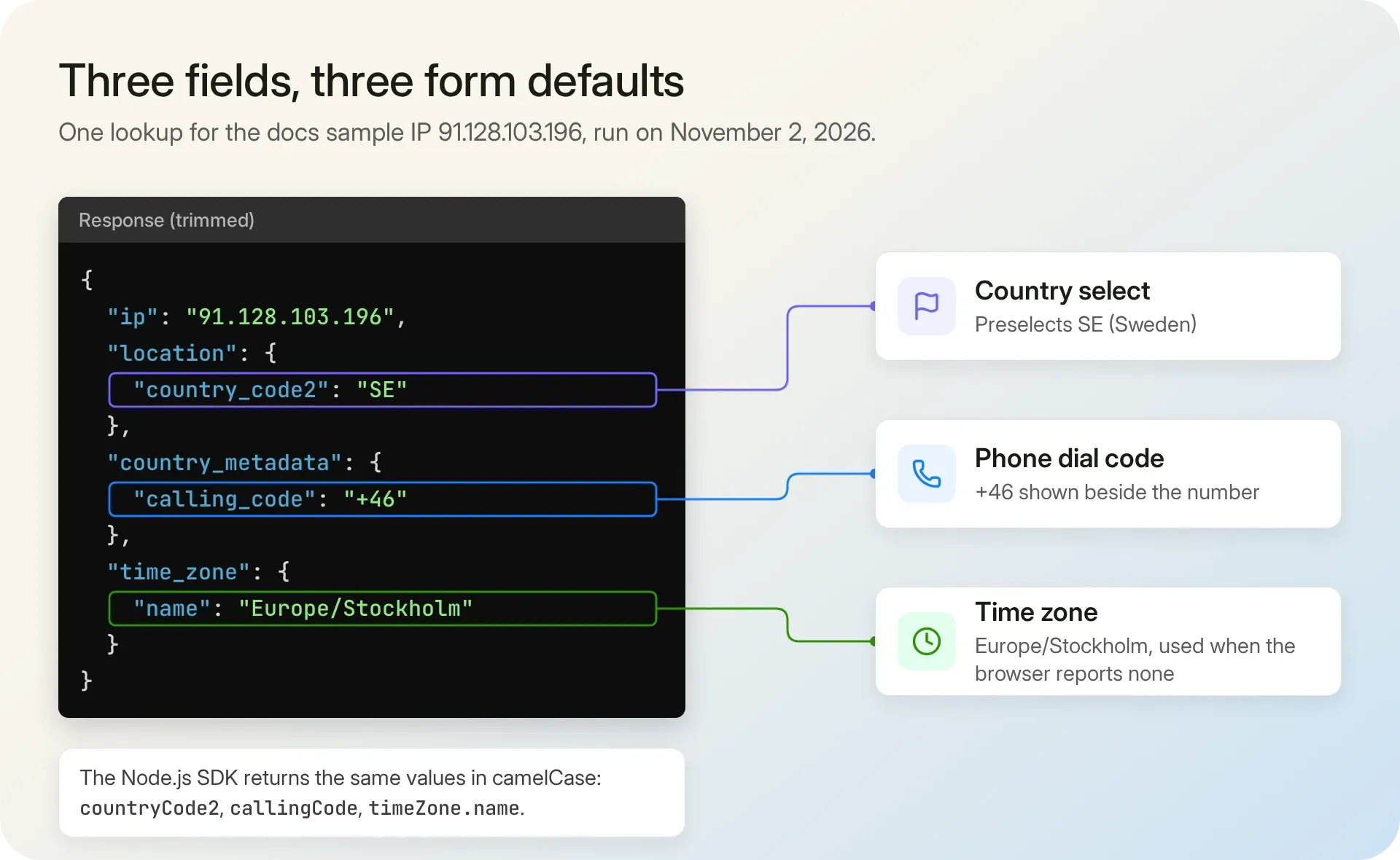
The page never reads callingCode, because intl-tel-input knows every country's dial code; it's there for phone fields built without a library, which can show it as a prefix.
A wrong key (401), a used-up allowance (429), a private address (423), or a lookup slower than 1.5 seconds returns null, and the form keeps its own defaults. We'd cache each IP for 15 to 60 minutes, long enough for one signup session. Several servers can share Redis instead of the Map, but skip long-lived cookies, because a visitor's IP changes with networks and VPNs.
Step 3: Serve the defaults from a small JSON endpoint
The signup page loads without waiting for the lookup, then asks your server for its defaults:
app.use(express.static("public")); // signup.html is the same file for every visitor

// Step 3: the form asks for its defaults here after the page has loaded
app.get("/api/signup-defaults", async (req, res) => {
  const defaults = await lookupDefaults(visitorIp(req));
  res.set("Cache-Control", "private, no-store"); // per visitor: never cache it in a CDN
  res.json(defaults ?? {}); // {} tells the form to keep its own defaults
});
Nothing about the visitor is in the HTML, so the page renders at once and caches like any static file; only the JSON varies, and no-store keeps a CDN from serving one visitor's country to the next.
With TEST_IP set, curl localhost:3000/api/signup-defaults prints:
{"country":"SE","callingCode":"+46","timeZone":"Europe/Stockholm"}
On localhost without TEST_IP, it prints {}, and the form falls back to its own defaults. Each new IP costs a lookup, so serve this endpoint to your signup page only, and rate-limit it per IP if bots hit your forms.
A page that must work without JavaScript can render the defaults into the HTML instead, at the cost of caching that page. An IP address can count as personal data under laws such as the GDPR, so mention the lookup in your privacy notice; see whether IPGeolocation.io stores the IPs you look up.
Step 4: Pre-select the phone dial code with intl-tel-input
In the page's <head>, start the request early, so the defaults usually arrive before the visitor reaches the phone field:
<script>
  // Start the lookup before the form is parsed; any failure resolves to {}
  window.signupDefaults = fetch("/api/signup-defaults")
    .then((res) => (res.ok ? res.json() : {}))
    .catch(() => ({}));
</script>
Then, in a script at the end of <body>, after intl-tel-input's own <script> tag, give the lookup 1.5 seconds, hand the country to the phone field, and fill the country select:
const form = document.querySelector("#signup");
const countrySelect = document.querySelector("#country");
const countrySource = document.querySelector("#country-source");
const phoneInput = document.querySelector("#phone");
const zoneSelect = document.querySelector("#time-zone");
const zoneSource = document.querySelector("#time-zone-source");

// A field the visitor has changed is never overwritten by a late default
countrySelect.addEventListener("change", () => {
  countrySelect.dataset.touched = "true";
  countrySource.value = "visitor";
});
zoneSelect.addEventListener("change", () => {
  zoneSelect.dataset.touched = "true";
  zoneSource.value = "visitor";
});

// Wait at most 1.5 seconds for the defaults; after that the form keeps its own
const defaults = Promise.race([
  window.signupDefaults,
  new Promise((resolve) => setTimeout(() => resolve({}), 1500)),
]);

// The phone field asks your endpoint, never a third-party service
const iti = window.intlTelInput(phoneInput, {
  initialCountryLookup: async () => {
    const { country } = await defaults;
    if (!country) throw new Error("No country detected"); // stays in the empty globe state
    return country.toLowerCase();
  },
  hiddenInputs: () => ({ phone: "phone_full" }), // submits the number in E.164
  loadUtils: () => import("https://cdn.jsdelivr.net/npm/intl-tel-input@29.5.10/dist/js/utils.js"),
});
// iti.promise rejects when no country was detected; the form already handles that case
iti.promise.catch(() => {});

// Step 4: the country select uses the same country list as the phone field.
// Fill it after creating the phone field: intl-tel-input adds the country names then.
for (const { iso2, name } of window.intlTelInput.getAllCountries()) {
  countrySelect.add(new Option(name, iso2.toUpperCase()));
}
defaults.then(({ country }) => {
  if (!country || countrySelect.dataset.touched) return;
  countrySelect.value = country;
  countrySource.value = "ip";
});
intl-tel-input draws the country code dropdown next to the phone number field. Its initialCountryLookup option replaced the older geoIpLookup: it takes a function that returns a Promise of a two-letter country code (intl-tel-input options). Here it reads your own endpoint, so the key never reaches the browser. The library warns that a wrong initial country can store a number with the wrong dial code; its default layout shows the dial code next to the number, so the visitor can see a wrong guess. hiddenInputs submits the full number in E.164 format.
getAllCountries() (getCountryData() before v29) gives the country select the phone field's 244 countries, and country_source records whether the IP or the visitor chose the country. The two fields stay independent on purpose: plenty of people live in one country and carry a phone number from another.
With the Swedish test IP, the field shows +46, and typing the placeholder number "70 123 45 67" submits phone_full=+46701234567. If the endpoint fails or runs past 1.5 seconds, the function throws, and no country is selected. The library's iti.promise then rejects too, and the empty catch keeps that expected case out of the browser console as an uncaught error.
Step 5: Set the time zone, and let the visitor's choice win
The browser reports the time zone set on the visitor's device with Intl.DateTimeFormat().resolvedOptions().timeZone, as an IANA name such as Europe/Stockholm (MDN). We trust it first, because the visitor's own clock uses it; the IP's time_zone.name fills in when the browser reports none:
// Step 5: the browser's time zone first, the IP's only when the browser has none
// Intl.supportedValuesOf reached all major browsers in 2022; older ones get the detected zones only
const zones = typeof Intl.supportedValuesOf === "function" ? Intl.supportedValuesOf("timeZone") : [];
for (const zone of zones) zoneSelect.add(new Option(zone.replaceAll("_", " "), zone));

function setZone(zone, source) {
  if (!zone || zoneSelect.dataset.touched) return;
  if (!zones.includes(zone)) zoneSelect.add(new Option(zone, zone)); // keep aliases the list lacks
  zoneSelect.value = zone;
  zoneSource.value = source;
}

setZone(Intl.DateTimeFormat().resolvedOptions().timeZone, "browser");

defaults.then(({ timeZone }) => {
  if (timeZone) document.querySelector("#ip-time-zone").value = timeZone; // kept for support
  if (!zoneSource.value) setZone(timeZone, "ip");
});
Intl.supportedValuesOf("timeZone") fills the select with the zones the browser knows. It has worked across major browsers since March 2022; an older browser gets only the detected zones, and the form still submits. When the browser and the IP disagree, the form keeps the browser's zone and sends the IP's in a hidden field: with the browser set to America/New_York and the Swedish test IP, our run submitted America/New_York plus ip_time_zone=Europe/Stockholm. A mismatch often means a VPN or a trip, which is useful context for support.
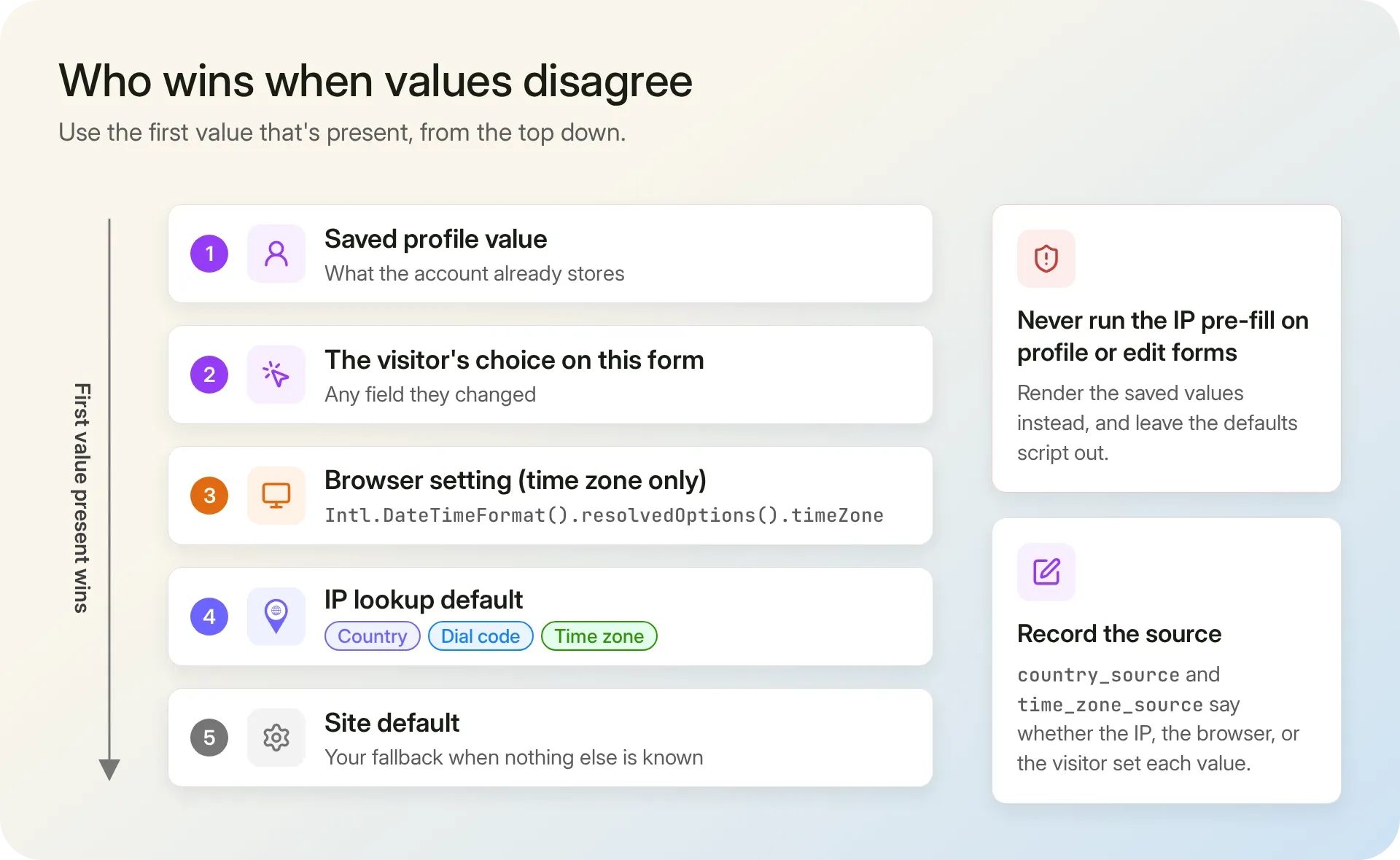
For every field, the first value that exists wins: a saved value, the visitor's choice, the browser (time zone only), the IP lookup, then your site default. The touched flags from Step 4 stop a late default from overwriting a field the visitor has changed, and on profile or edit forms you render the saved values and leave the defaults script out.
The complete code
Save the two files, run IPGEO_API_KEY=your_api_key TEST_IP=91.128.103.196 node server.js, and open localhost:3000/signup.html. We ran both on November 2, 2026; submitting the form with the placeholder number returned:
{"email":"ana@example.com","country":"SE","countrySource":"ip","phone":"+46701234567","timeZone":"Europe/Stockholm","timeZoneSource":"browser","ipTimeZone":"Europe/Stockholm"}
server.js:
import express from "express";
import {
  IpGeolocationClient,
  LockedError,
  RateLimitError,
  UnauthorizedError,
} from "ip-geolocation-api-javascript-sdk";
import parsePhoneNumber from "libphonenumber-js/max";

const ipgeo = new IpGeolocationClient({
  apiKey: process.env.IPGEO_API_KEY,
  connectTimeoutMs: 1000, // 1.5 seconds in total, the same time the form waits
  readTimeoutMs: 500,
});

const CACHE_MS = 30 * 60 * 1000; // 30 minutes covers a typical signup session
const cache = new Map();

// Step 2: country, dial code, and time zone for one IP, cached per IP
async function lookupDefaults(ip) {
  const hit = cache.get(ip);
  if (hit && hit.expires > Date.now()) return hit.value;

  let value = null;
  try {
    const { data } = await ipgeo.lookupIpGeolocation({
      ip,
      fields: ["location.country_code2", "country_metadata.calling_code", "time_zone.name"],
    });
    // The SDK returns camelCase: country_code2 arrives as countryCode2
    value = {
      country: data.location?.countryCode2 ?? null,
      callingCode: data.countryMetadata?.callingCode ?? null,
      timeZone: data.timeZone?.name ?? null,
    };
  } catch (err) {
    if (err instanceof LockedError) {
      // 423: a private or bogon IP, such as ::1 on localhost; nothing to detect
    } else if (err instanceof UnauthorizedError || err instanceof RateLimitError) {
      console.error(`IPGeolocation.io ${err.statusCode}: ${err.apiMessage ?? err.message}`);
    } else {
      console.error(`Defaults lookup failed for ${ip}: ${err.message}`);
    }
  }

  // Cache a failure for one minute only, so a single timeout doesn't stick for the session
  cache.set(ip, { value, expires: Date.now() + (value ? CACHE_MS : 60 * 1000) });
  if (cache.size > 50_000) cache.delete(cache.keys().next().value);
  return value;
}

const app = express();
app.set("trust proxy", 1); // one proxy (your load balancer) in front; match your setup
app.use(express.static("public")); // signup.html is the same file for every visitor

// Step 1: the visitor's IP; TEST_IP only replaces loopback addresses during local tests
function visitorIp(req) {
  const isLocal = ["::1", "127.0.0.1", "::ffff:127.0.0.1"].includes(req.ip);
  return isLocal && process.env.TEST_IP ? process.env.TEST_IP : req.ip;
}

// Step 3: the form asks for its defaults here after the page has loaded
app.get("/api/signup-defaults", async (req, res) => {
  const defaults = await lookupDefaults(visitorIp(req));
  res.set("Cache-Control", "private, no-store"); // per visitor: never cache it in a CDN
  res.json(defaults ?? {}); // {} tells the form to keep its own defaults
});

// Step 5: store what the visitor submitted and where each default came from
app.post("/signup", express.urlencoded({ extended: false }), (req, res) => {
  const {
    email, country, country_source, phone, phone_full, phone_country,
    time_zone, time_zone_source, ip_time_zone,
  } = req.body;

  // Browser checks can be skipped, so check the number again here. phone_full is empty when
  // utils.js didn't load; then read the typed number with the phone field's country.
  let e164 = null;
  if (phone_full || phone) {
    const parsed = parsePhoneNumber(phone_full || phone, phone_country?.toUpperCase() || undefined);
    if (!parsed?.isValid()) {
      return res.status(400).json({ error: "Check the phone number and its country code." });
    }
    e164 = parsed.number; // E.164, such as +46701234567
  }

  // Save these to your user store. A country from "ip" is a suggestion the visitor kept,
  // not a verified country of residence.
  res.json({
    email,
    country,
    countrySource: country_source || "visitor",
    phone: e164,
    timeZone: time_zone,
    timeZoneSource: time_zone_source,
    ipTimeZone: ip_time_zone || null,
  });
});

app.listen(3000, (err) => {
  if (err) throw err; // Express 5 passes startup errors here, such as port 3000 already in use
  console.log("Signup form on localhost:3000/signup.html");
});
The /signup handler checks the phone number again: a browser check can be skipped, and it never runs when utils.js fails to load. libphonenumber-js reads phone_full, or the typed number with the field's country from phone_country; its max metadata checks the digits, not only the length. With utils.js blocked in our run, "70 123 45 67" was still stored as +46701234567, and "12" got HTTP 400.
public/signup.html:
<!doctype html>
<html lang="en">
<head>
  <meta charset="utf-8">
  <meta name="viewport" content="width=device-width, initial-scale=1">
  <title>Create your account</title>
  <link rel="stylesheet" href="https://cdn.jsdelivr.net/npm/intl-tel-input@29.5.10/dist/css/intlTelInput.css">
  <script>
    // Start the lookup before the form is parsed; any failure resolves to {}
    window.signupDefaults = fetch("/api/signup-defaults")
      .then((res) => (res.ok ? res.json() : {}))
      .catch(() => ({}));
  </script>
</head>
<body>
  <form id="signup" method="post" action="/signup">
    <label for="email">Email</label>
    <input id="email" name="email" type="email" autocomplete="email" required>

    <label for="country">Country</label>
    <select id="country" name="country" autocomplete="country" required>
      <option value="">Choose your country</option>
    </select>
    <input type="hidden" id="country-source" name="country_source">

    <label for="phone">Phone</label>
    <input id="phone" name="phone" type="tel" autocomplete="tel">
    <input type="hidden" id="phone-country" name="phone_country">
    <p id="phone-error" role="alert" hidden>Check the phone number and its country code.</p>

    <label for="time-zone">Time zone</label>
    <select id="time-zone" name="time_zone" required>
      <option value="">Choose your time zone</option>
    </select>
    <input type="hidden" id="time-zone-source" name="time_zone_source">
    <input type="hidden" id="ip-time-zone" name="ip_time_zone">

    <button type="submit">Create account</button>
  </form>

  <script src="https://cdn.jsdelivr.net/npm/intl-tel-input@29.5.10/dist/js/intlTelInput.min.js"></script>
  <script>
    const form = document.querySelector("#signup");
    const countrySelect = document.querySelector("#country");
    const countrySource = document.querySelector("#country-source");
    const phoneInput = document.querySelector("#phone");
    const zoneSelect = document.querySelector("#time-zone");
    const zoneSource = document.querySelector("#time-zone-source");

    // A field the visitor has changed is never overwritten by a late default
    countrySelect.addEventListener("change", () => {
      countrySelect.dataset.touched = "true";
      countrySource.value = "visitor";
    });
    zoneSelect.addEventListener("change", () => {
      zoneSelect.dataset.touched = "true";
      zoneSource.value = "visitor";
    });

    // Wait at most 1.5 seconds for the defaults; after that the form keeps its own
    const defaults = Promise.race([
      window.signupDefaults,
      new Promise((resolve) => setTimeout(() => resolve({}), 1500)),
    ]);

    // The phone field asks your endpoint, never a third-party service
    const iti = window.intlTelInput(phoneInput, {
      initialCountryLookup: async () => {
        const { country } = await defaults;
        if (!country) throw new Error("No country detected"); // stays in the empty globe state
        return country.toLowerCase();
      },
      hiddenInputs: () => ({ phone: "phone_full" }), // submits the number in E.164
      loadUtils: () => import("https://cdn.jsdelivr.net/npm/intl-tel-input@29.5.10/dist/js/utils.js"),
    });
    // iti.promise rejects when no country was detected; the form already handles that case
    iti.promise.catch(() => {});

    // Step 4: the country select uses the same country list as the phone field.
    // Fill it after creating the phone field: intl-tel-input adds the country names then.
    for (const { iso2, name } of window.intlTelInput.getAllCountries()) {
      countrySelect.add(new Option(name, iso2.toUpperCase()));
    }
    defaults.then(({ country }) => {
      if (!country || countrySelect.dataset.touched) return;
      countrySelect.value = country;
      countrySource.value = "ip";
    });

    // Step 5: the browser's time zone first, the IP's only when the browser has none
    // Intl.supportedValuesOf reached all major browsers in 2022; older ones get the detected zones only
    const zones = typeof Intl.supportedValuesOf === "function" ? Intl.supportedValuesOf("timeZone") : [];
    for (const zone of zones) zoneSelect.add(new Option(zone.replaceAll("_", " "), zone));

    function setZone(zone, source) {
      if (!zone || zoneSelect.dataset.touched) return;
      if (!zones.includes(zone)) zoneSelect.add(new Option(zone, zone)); // keep aliases the list lacks
      zoneSelect.value = zone;
      zoneSource.value = source;
    }

    setZone(Intl.DateTimeFormat().resolvedOptions().timeZone, "browser");

    defaults.then(({ timeZone }) => {
      if (timeZone) document.querySelector("#ip-time-zone").value = timeZone; // kept for support
      if (!zoneSource.value) setZone(timeZone, "ip");
    });

    // Block the submit only when a phone number is present and invalid
    form.addEventListener("submit", (event) => {
      // The phone field's country lets the server read the number if utils.js never loaded
      document.querySelector("#phone-country").value = iti.getSelectedCountry()?.iso2 ?? "";
      const error = document.querySelector("#phone-error");
      let valid = true;
      try {
        valid = !phoneInput.value.trim() || iti.isValidNumber();
      } catch {
        // utils.js not loaded yet: validate the number on the server instead
      }
      error.hidden = valid;
      if (!valid) event.preventDefault();
    });
  </script>
</body>
</html>
When the IP suggests the wrong country
Every IP data provider meets the same limits: VPN and proxy exits, iCloud Private Relay, corporate gateways, mobile carrier routing, and travel can place the IP away from the person filling in the form. IPGeolocation.io's security data flags many of these cases, as this documented sample shows:
# include=security needs a paid plan; a free key gets HTTP 401
curl "https://api.ipgeolocation.io/v3/ipgeo?apiKey=$IPGEO_API_KEY&ip=2.56.188.34&include=security&fields=location.country_code2,location.city,time_zone.name,security.is_vpn,security.is_anonymous"
{"ip":"2.56.188.34","location":{"country_code2":"US","city":"Dallas"},"security":{"is_vpn":true,"is_anonymous":true},"time_zone":{"name":"America/Chicago"}}
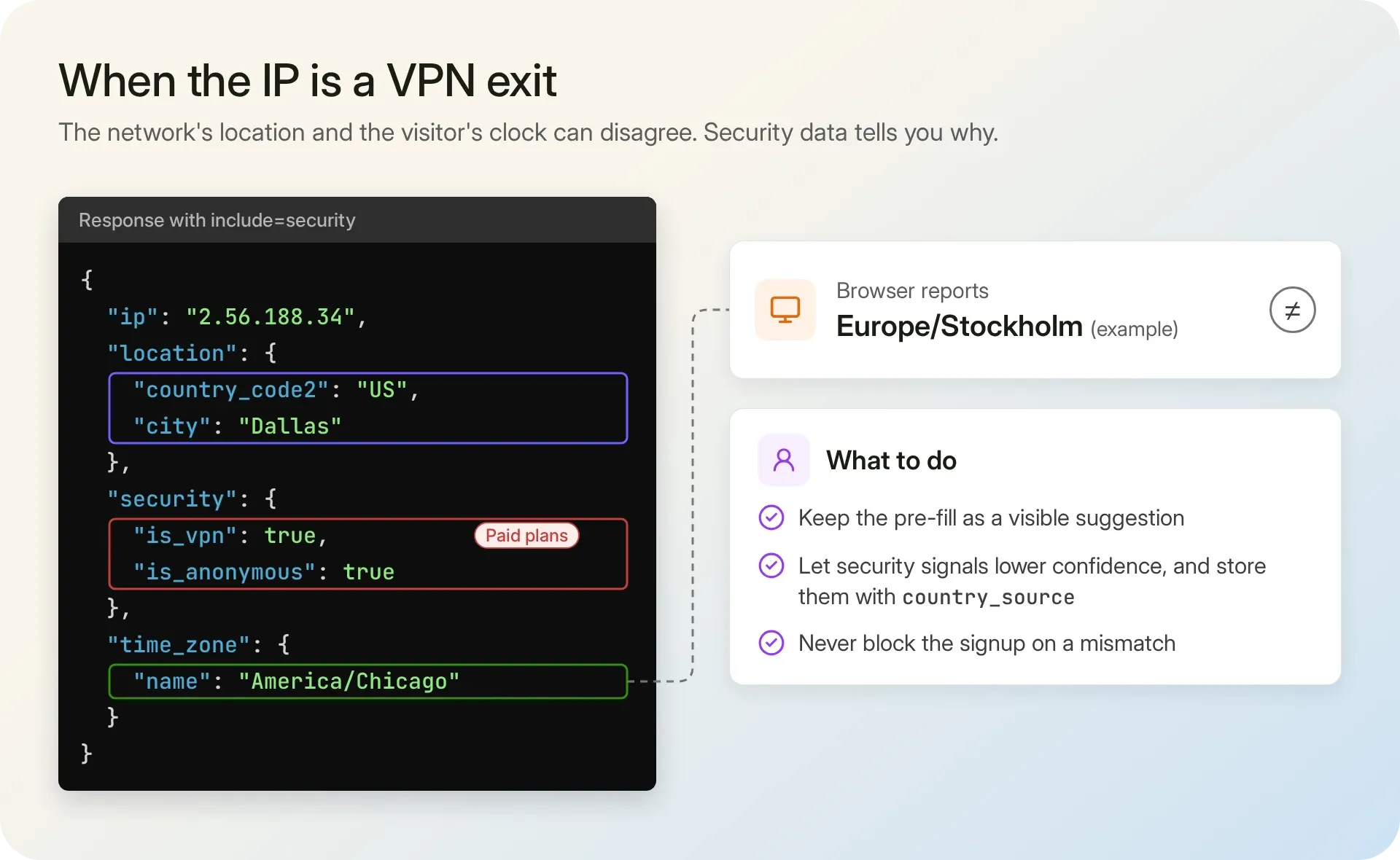
We still pre-fill here, as a visible suggestion. The flags change how much you rely on the value, so request the anonymizer flag in lookupDefaults too, return it with the defaults, and store it next to country_source:
// Needs a paid key: include adds the security object (a free key gets HTTP 401)
const { data } = await ipgeo.lookupIpGeolocation({
  ip,
  include: ["security"],
  fields: ["location.country_code2", "country_metadata.calling_code", "time_zone.name", "security.is_anonymous"],
});
const isAnonymous = data.security?.isAnonymous ?? false;
Never block a signup because the IP and the browser disagree. For other uses of these signals, check whether an IP is a VPN, proxy, or Tor exit.
Beyond the three defaults
IPGeolocation.io gives you the most complete IP data in a single call: one request can return geolocation, security data (VPN, proxy, Tor, and relay detection with a threat score), ASN, company, abuse contact, time zone, and user agent data. At country level, the level these defaults rely on, our stated accuracy is 99%+, with lower accuracy on mobile networks.
The fields in this tutorial are part of the free plan, and you can compare free and paid plans for the rest. On paid plans, Request Origin authentication lets a site with no server of its own call the API from the browser with no key at all: the API accepts requests from the domains you allow.
FAQ
How do I auto-detect the country code for a phone number input?
Look up the visitor's IP on your server, return the two-letter country code from your own endpoint, and pass it to the phone field's initialCountryLookup in intl-tel-input. The dial code, such as +46 for Sweden, then shows next to the number, and the visitor can change it.
How do I get a user's time zone without asking them?
Read Intl.DateTimeFormat().resolvedOptions().timeZone in the browser; it returns the IANA name of the device's zone, such as Europe/Stockholm. When the browser reports nothing, use time_zone.name from an IP lookup on your server, and let the user change it.
Is it free to look up the country, calling code, and time zone from an IP?
Yes, on IPGeolocation.io's free plan: location, country metadata (which holds the calling code), and time zone are all included, and each lookup costs 1 credit. The free Developer plan gives you 1,000 credits a day for life, with no credit card. Paid plans add more data, such as accuracy radius, company, network, and security data.
Why does my form show the wrong country for some visitors?
The visitor's IP belongs to a network somewhere else, such as a VPN or proxy exit, iCloud Private Relay, a corporate gateway, or a mobile carrier, or the visitor is traveling. Security data flags many of these cases; a visible, editable default handles the rest.